render_with_shadow.py#
render_with_shadow.py
Render object from the random top view with random light position. The object rendered as if it drops the shadow on the invisible plane. The shadow represented as the alpha channel of the final image.
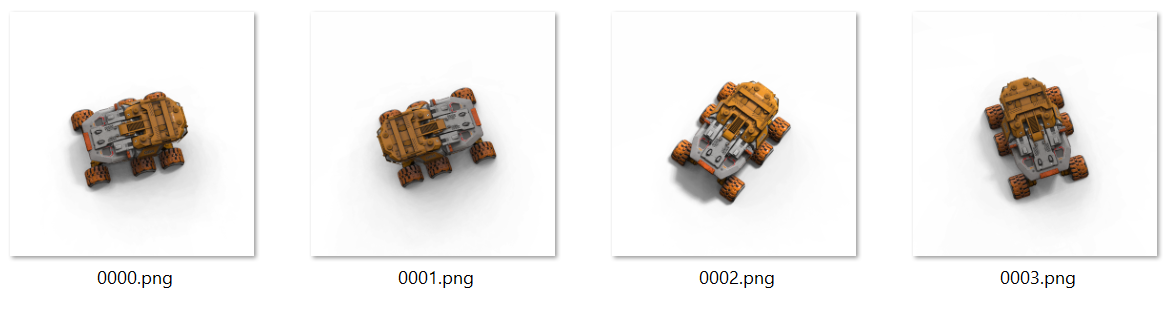
1# this examle takes the mesh from the paint or sculpt room, renders from above (a bit random direction, random light) and saves the rendered image to the
2# specified path. This example demonstrates the camera manipulation and rendering.
3# The object rendered as if it drops the shadow on the invisible plane.
4# The shadow represented as the alpha channel of the final image.
5
6from coat import *
7import random
8
9# the scene scale and shift, we need to create the correct render background
10ssc = Scene.GetSceneScale()
11shift = Scene.getSceneShift()
12
13# the mesh from the paint room
14m = Mesh()
15m.fromPaintRoom()
17
18bb = m.getBounds()
19# we need to scale bound box to get it in scene (nt world) units because sculpt objects measured in scene units as well
20# but exported mesh is in world units
22
23# remove any existing background, calculate boundbox of sculpt objects in scene, if any
24def removebg(x):
25 if x.name() == "bg_round":
26 x.clear()
27 x.remove()
28 else:
29 bb.AddBounds(x.Volume().calcWorldSpaceAABB())
30 return False
31def removeBgObject():
33
34# remove any existing background
35removeBgObject()
36
37if(bb.IsEmpty()):
38 dialog.text("The scene is empty").ok().show()
39 exit(1)
40
41bottom = bb.GetMin().y
42m1 = bb.GetMin()
43m2 = bb.GetMax()
44# we set y to zero because we need object size from the above, so we measure diagonal from the above
45m1.y = m2.y = 0
46radius = m1.distance(m2) * 2
47
48cyl = Mesh.cylinder(vec3(0,bottom - radius/20,0), radius, radius/10,0,16,128,128,0)
49
50v=Volume()
51# create background object
53v.toSurface()
54cyl.toVolume(v)
55# set the simplest possible flat shader for the background object
64
66
67base = io.currentSceneFilepath()
68# get the file name without extension and full path
69base = io.getFileName(base)
70base = base[:base.rfind(".")]
71
72#setup the render room, we take 512*512 images with 256 rays per frame
75height = io.workArea().GetHeight()
76
77# we need just N frames to render
78N = 4
79for j in range(0, N):
80 #setup the random light, random ambient light and random camera position (from above)
81 value = random.random() * 0.5
85 ldir = vec3.RandNormal()
86 ldir += vec3.AxisY*2
87 ldir.Normalize()
92
93 # the direction from above with a bit random horizontal shift
95 start.Normalize()
96 # distant anough to fit the object into the square image
97 start *= radius*4*height/2000
98 # FOV is 50 degrees
100
101 # look the progress in the header
103
104 # render the frame on the RED background
108
109 # the GREEN background
113
114 # we use 2 images with red and green background to remove the background and the the alpha channel (incliding shadow ovwr the invisible plane)
115 io.removeBackground(f"UserPrefs/render/red.png",f"UserPrefs/render/green.png",f"UserPrefs/render/result/{base}/{j:04d}.png")
118
120removeBgObject()
  1     # this examle takes the mesh from the paint or sculpt room, renders from above (a bit random direction, random light) and saves the rendered image to the
  2     # specified path. This example demonstrates the camera manipulation and rendering.
  3     # The object rendered as if it drops the shadow on the invisible plane.
  4     # The shadow represented as the alpha channel of the final image.
  5
  6     from coat import *
  7     import random
  8
  9     # the scene scale and shift, we need to create the correct render background
 10     ssc = Scene.GetSceneScale()
 11     shift = Scene.getSceneShift()
 12
 13     # the mesh from the paint room
 14     m = Mesh()
 15     m.fromPaintRoom()
 16     m.transform(mat4.Translation(vec3(0, - shift.y * ssc,0)))
 17
 18     bb = m.getBounds()
 19     # we need to scale bound box to get it in scene (nt world) units because sculpt objects measured in scene units as well
 20     # but exported mesh is in world units
 21     bb = boundbox.Transform(bb, mat4.Scaling(ssc))
 22
 23     # remove any existing background, calculate boundbox of sculpt objects in scene, if any
 24     def removebg(x):
 25             if x.name() == "bg_round":
 26                     x.clear()
 27                     x.remove()
 28             else:
 29                     bb.AddBounds(x.Volume().calcWorldSpaceAABB())
 30             return False
 31     def removeBgObject():
 32             for i in range(2) : Scene.sculptRoot().iterateVisibleSubtree(removebg)
 33
 34     # remove any existing background
 35     removeBgObject()
 36
 37     if(bb.IsEmpty()):
 38             dialog.text("The scene is empty").ok().show()
 39             exit(1)
 40
 41     bottom = bb.GetMin().y
 42     m1 = bb.GetMin()
 43     m2 = bb.GetMax()
 44     # we set y to zero because we need object size from the above, so we measure diagonal from the above
 45     m1.y = m2.y = 0
 46     radius = m1.distance(m2) * 2
 47
 48     cyl = Mesh.cylinder(vec3(0,bottom - radius/20,0), radius, radius/10,0,16,128,128,0)
 49
 50     v=Volume()
 51     # create background object
 52     v = Scene.sculptRoot().addChild("bg_round").Volume()
 53     v.toSurface()
 54     cyl.toVolume(v)
 55     # set the simplest possible flat shader for the background object
 56     v.setBoolShaderProperty("UseColorTexture", False)
 57     v.setBoolShaderProperty("UseGlossTexture", False)
 58     v.setBoolShaderProperty("UseMetalnessTexture", False)
 59     v.setBoolShaderProperty("UseNormalmapTexture", False)
 60     v.setBoolShaderProperty("UseCavity", False)
 61     v.setBoolShaderProperty("FlatShading", False)
 62     v.setFloatShaderProperty("Gloss",0)
 63     v.setFloatShaderProperty("Metalness",0)
 64
 65     RenderRoom.toRenderRoom()
 66
 67     base = io.currentSceneFilepath()
 68     # get the file name without extension and full path
 69     base = io.getFileName(base)
 70     base = base[:base.rfind(".")]
 71
 72     #setup the render room, we take 512*512 images with 256 rays per frame
 73     RenderRoom.setCustomRenderSize(512, 512)
 74     RenderRoom.setRaysPerFrame(256)
 75     height = io.workArea().GetHeight()
 76
 77     # we need just N frames to render
 78     N = 4
 79     for j in range(0, N):
 80             #setup the random light, random ambient light and random camera position (from above)
 81             value = random.random() * 0.5
 82             RenderRoom.removeAllLights()
 83             RenderRoom.addLight()
 84             RenderRoom.setEnvironmentLight(100 - value * 50)
 85             ldir = vec3.RandNormal()
 86             ldir += vec3.AxisY*2
 87             ldir.Normalize()
 88             RenderRoom.setLightDirection(0, ldir)
 89             RenderRoom.setLightColor(0)
 90             RenderRoom.setLightIntensity(0, value)
 91             RenderRoom.setLightScattering(0,0.1)
 92
 93             # the direction from above with a bit random horizontal shift
 94             start = vec3.RandNormal() + vec3.AxisY*3
 95             start.Normalize()
 96             # distant anough to fit the object into the square image
 97             start *= radius*4*height/2000
 98             # FOV is 50 degrees
 99             Camera.setCamera(start, vec3(0,0,0), 50)
100
101             # look the progress in the header
102             io.progressBarInWindowHeader(j, N-1, "Rendering")
103
104             # render the frame on the RED background
105             v.setColorShaderProperty("Color",0xFFFF0000)
106             RenderRoom.setRenderResult(f"UserPrefs/render/red.png")
107             RenderRoom.renderFrame()
108
109             # the GREEN background
110             v.setColorShaderProperty("Color",0xFF00FF00)
111             RenderRoom.setRenderResult(f"UserPrefs/render/green.png")
112             RenderRoom.renderFrame()
113
114             # we use 2 images with red and green background to remove the background and the the alpha channel (incliding shadow ovwr the invisible plane)
115             io.removeBackground(f"UserPrefs/render/red.png",f"UserPrefs/render/green.png",f"UserPrefs/render/result/{base}/{j:04d}.png")
116             io.removeFile(f"UserPrefs/render/red.png")
117             io.removeFile(f"UserPrefs/render/green.png")
118
119     io.exec(io.documents("UserPrefs/render/result/"))
120     removeBgObject()