meshes_primitives.py#
meshes_primitives.py
Meshes and primitives
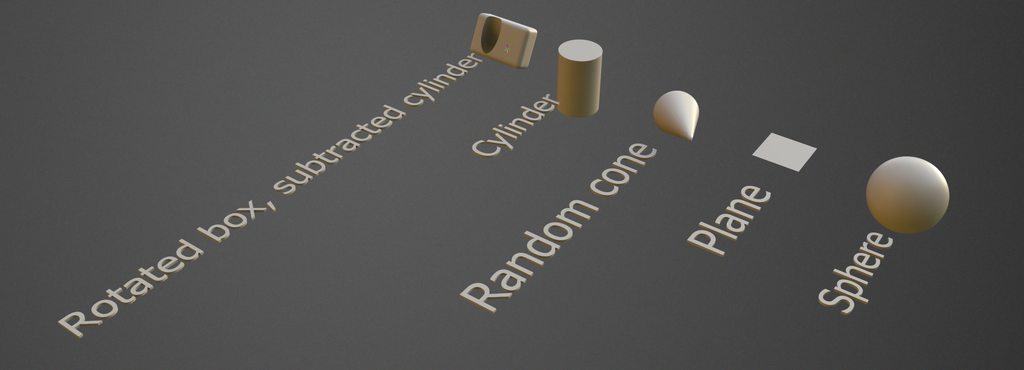
1# This example demonstrate adding prumitives into the mesh, then we merge the mesh into the scene
2import coat
4from coat import Mesh
5
6# add the new sculpt volume named "meshes"
8# turn into the surface mode
9root.toSurface()
10
11# first, we create the box
12mesh = Mesh.box(size=vec3(10,20,30), yAxis=vec3(0.5,1,0), center=vec3(3,4,5),detail_size=2, fillet=2)
13# subtract the cylinder from the box
14mesh.booleanOp(Mesh.cylinder(radius = 5,height = 30, detail_size = 2),coat.BoolOpType.BOOL_SUBTRACT)
15
16# this is the text near the box
17mesh += Mesh.text("Rotated box, subtracted cylinder",height = 15, center = vec3(-10,0,0), align = 2)
18
19# we add the cylinder to the mesh
20mesh += Mesh.cylinder(center = vec3(0, 0, 50),radius = 10,height = 30, detail_size = 2)
22
23# the cone with the random direction
24mesh += Mesh.cone(center = vec3(0, 0, 100), topAxis = vec3.RandNormal(), radius = 10, height = 50, detail_size = 2)
26
27# plane
28mesh += Mesh.plane(center = vec3(0, 0, 150), sizeX = 20, sizeY = 20, divisionsX = 7, divisionsY = 9, xAxis = vec3.AxisX, yAxis = vec3.AxisZ)
30
31# sphere
32mesh += Mesh.sphere(center = vec3(0, 0, 200), radius = 15)
34
35# uncommend the line below to merge all objects into the single one
36# mesh.unifyAllObjects()
37
38# merge the summary mesh into scene
39root.mergeMesh(mesh)
 1     # This example demonstrate adding prumitives into the mesh, then we merge the mesh into the scene
 2     import coat
 3     from coat import vec3
 4     from coat import Mesh
 5
 6     # add the new sculpt volume named "meshes"
 7     root = coat.Scene.sculptRoot().addChild("meshes").Volume()
 8     # turn into the surface mode
 9     root.toSurface()
10
11     # first, we create the box
12     mesh = Mesh.box(size=vec3(10,20,30), yAxis=vec3(0.5,1,0), center=vec3(3,4,5),detail_size=2, fillet=2)
13     # subtract the cylinder from the box
14     mesh.booleanOp(Mesh.cylinder(radius = 5,height = 30, detail_size = 2),coat.BoolOpType.BOOL_SUBTRACT)
15
16     # this is the text near the box
17     mesh += Mesh.text("Rotated box, subtracted cylinder",height = 15, center = vec3(-10,0,0), align = 2)
18
19     # we add the cylinder to the mesh
20     mesh += Mesh.cylinder(center = vec3(0, 0, 50),radius = 10,height = 30, detail_size = 2)
21     mesh += Mesh.text("Cylinder",height = 15, center = vec3(-20, 0, 50), align = 2)
22
23     # the cone with the random direction
24     mesh += Mesh.cone(center = vec3(0, 0, 100), topAxis = vec3.RandNormal(), radius = 10, height = 50, detail_size = 2)
25     mesh += Mesh.text("Random cone",height = 15, center = vec3(-30, 0, 100), align = 2)
26
27     # plane
28     mesh += Mesh.plane(center = vec3(0, 0, 150), sizeX = 20, sizeY = 20, divisionsX = 7, divisionsY = 9, xAxis = vec3.AxisX, yAxis = vec3.AxisZ)
29     mesh += Mesh.text("Plane",height = 15, center = vec3(-30, 0, 150), align = 2)
30
31     # sphere
32     mesh += Mesh.sphere(center = vec3(0, 0, 200), radius = 15)
33     mesh += Mesh.text("Sphere",height = 15, center = vec3(-30, 0, 200), align = 2)
34
35     # uncommend the line below to merge all objects into the single one
36     # mesh.unifyAllObjects()
37
38     # merge the summary mesh into scene
39     root.mergeMesh(mesh)