Mouse and Cursor Extension Example#
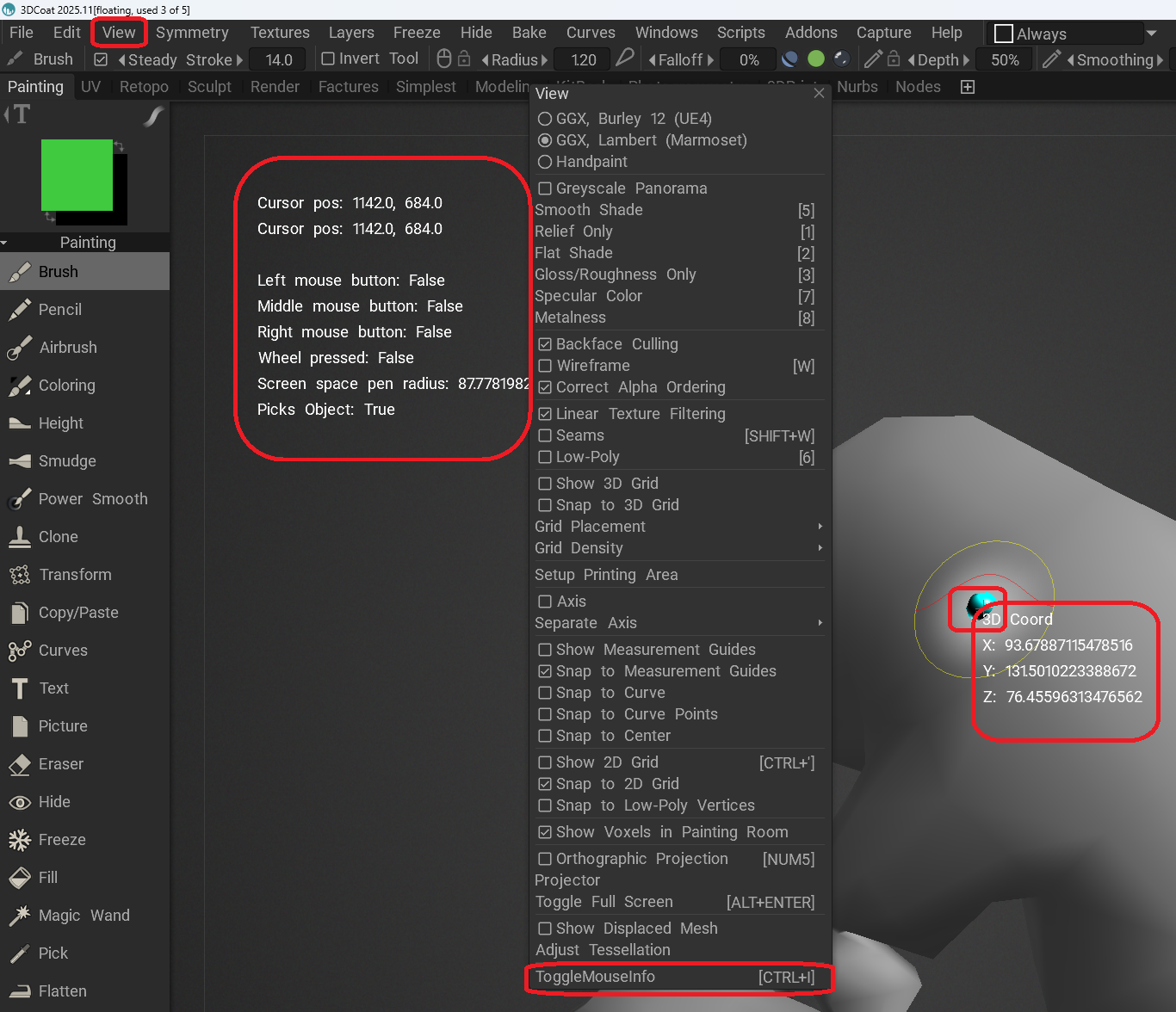
This is an example of an extension that displays information about both the mouse and cursor.
This example shows how to write an extension, how to display information about the mouse and cursor, how to display the information in the viewport, and how to add a menu item with its own function.
Note
You can assign a hotkey to a menu item you created by hovering your mouse over it and pressing the END button.
Installation#
To install the extension in 3DCoat, copy this file to:
Documents\3DCoat\UserPrefs\Scripts\cExtensions\MouseTest\MouseTest.py
Create any missing folders.
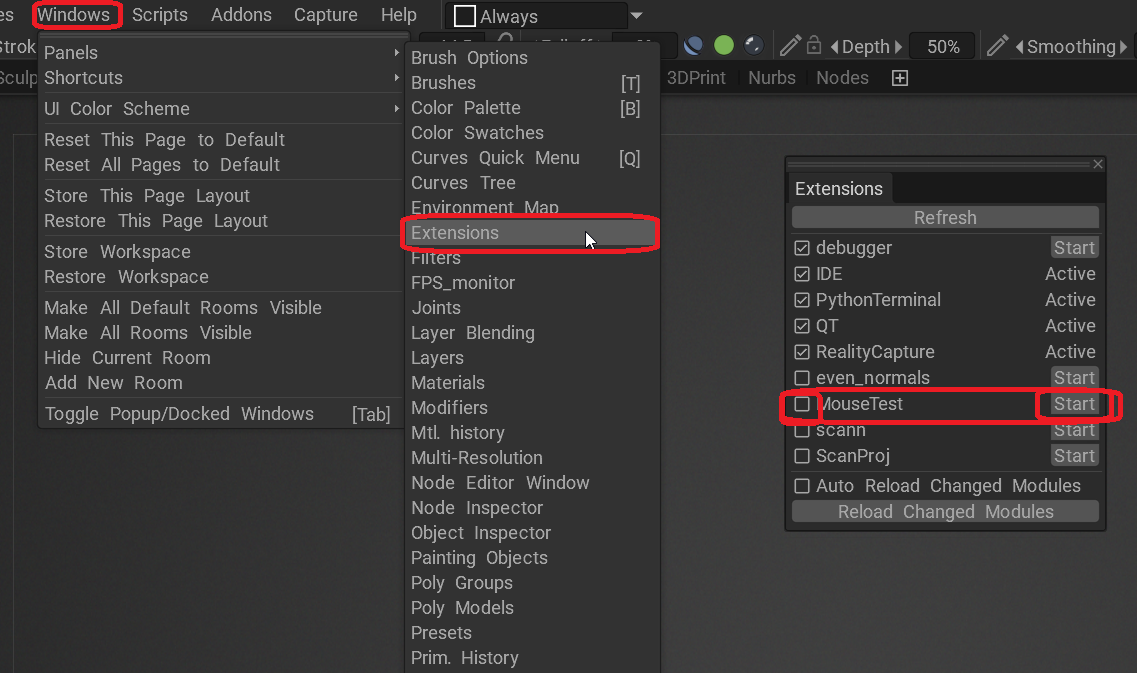
After 3DCoat is loaded, the MouseTest extension will appear in the “Extensions” window. To enable it, click the “Start” button to the right of the extension’s name. If you want the extension to start automatically after 3DCoat starts, check the box to the left of the extension’s name.
Debugging and Editing#
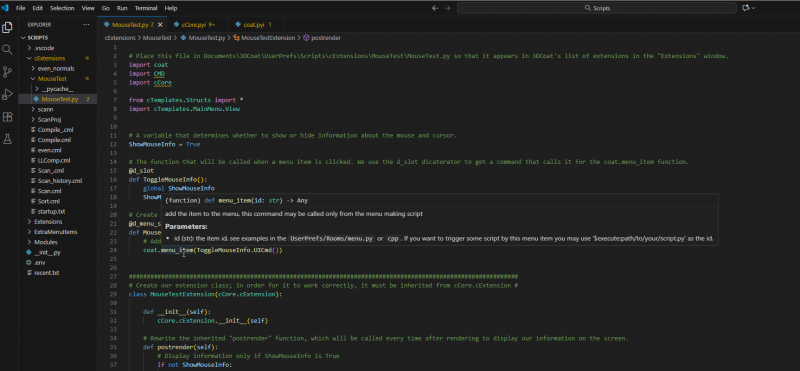
To easily edit extensions, open the Documents\3DCoat\UserPrefs\Scripts folder in Visual Studio Code.
Then you can:
See the documentation in hints.
Go to modules by holding down the Ctrl key and clicking.
Activate the debugger by pressing F5 in Visual Studio Code after launching 3DCoat.
 1
 2# Place this file in Documents\3DCoat\UserPrefs\Scripts\cExtensions\MouseTest\MouseTest.py so that it appears in 3DCoat's list of extensions in the "Extensions" window.
 3import coat
 4import CMD
 5import cPy.cCore
 6import cPy.cRender
 7
 8from cTemplates.Structs import *
 9import cTemplates.MainMenu.View
10
11
12# A variable that determines whether to show or hide information about the mouse and cursor.
13ShowMouseInfo = True
14
15# The function that will be called when a menu item is clicked. We use the d_slot dicatorator to get a command that calls it for the coat.menu_item function.
16@d_slot
17def ToggleMouseInfo():
18    global ShowMouseInfo
19    ShowMouseInfo = not ShowMouseInfo
20
21# Create a separate section for our extension in the View menu.
22@d_menu_section(cTemplates.MainMenu.View.CreateViewMenu)
23def MouseInfoSection():
24    # Add a menu item to this section that will enable and disable information about the mouse and cursor.
25    coat.menu_item(ToggleMouseInfo.UICmd())
26
27
28#############################################################################################################
29# Create our extension class; in order for it to work correctly, it must be inherited from cPy.cCore.cExtension #
30class MouseTestExtension(cPy.cCore.cExtension):
31
32    def __init__(self):
33        cPy.cCore.cExtension.__init__(self)
34
35    # Rewrite the inherited "postrender" function, which will be called every time after rendering to display our information on the screen.
36    def postrender(self):
37        # Display information only if ShowMouseInfo is True
38        if not ShowMouseInfo:
39            return
40
41        # display information about the mouse and cursor as text on the viewport.
42        cPy.cRender.RenderUtils.draw_text(300, 200, f"Cursor pos: {coat.io.cursorPos().x}, {coat.io.cursorPos().y}") #cursor pos (variant 1)
43        cPy.cRender.RenderUtils.draw_text(300, 230, f"Cursor pos: {CMD.GetMouseX()}, {CMD.GetMouseY()}")#cursor pos (variant 2)
44
45        cPy.cRender.RenderUtils.draw_text(300, 290, f"Left mouse button: {CMD.LMBPressed()}")
46        cPy.cRender.RenderUtils.draw_text(300, 320, f"Middle mouse button: {CMD.MMBPressed()}")
47        cPy.cRender.RenderUtils.draw_text(300, 350, f"Right mouse button: {CMD.RMBPressed()}")
48        cPy.cRender.RenderUtils.draw_text(300, 380, f"Wheel pressed: {CMD.WheelPressed()}")
49
50        cPy.cRender.RenderUtils.draw_text(300, 410, f"Screen space pen radius: {CMD.GetVisiblePenRadius()}")
51
52        cPy.cRender.RenderUtils.draw_text(300, 440, f"Picks Object: {CMD.ScreenRayPicksObject(CMD.GetMouseX(), CMD.GetMouseY())}")
53
54        # If the cursor is hovering over an object, we draw a sphere on the object and display the 3D coordinates of the point the cursor is hovering over.
55        if CMD.ScreenRayPicksObject(CMD.GetMouseX(), CMD.GetMouseY()):
56
57            # Find out the 3D coordinates of the point the cursor is hovering over.
58            pickPos: coat.vec3 = cPy.cRender.RenderUtils.PickPointSpacePos()
59
60            # draw a sphere
61            cPy.cRender.RenderUtils.drawCoolSphere(pickPos, 10.0, int("FF00FFFF", 16))
62
63            # Displaying 3D coordinates as text in the viewport
64            mx = CMD.GetMouseX()
65            my = CMD.GetMouseY()
66            cPy.cRender.RenderUtils.draw_text(mx, my, " 3D Coord")
67            cPy.cRender.RenderUtils.draw_text(mx, my+30, f" X: {pickPos.x}")
68            cPy.cRender.RenderUtils.draw_text(mx, my+60, f" Y: {pickPos.y}")
69            cPy.cRender.RenderUtils.draw_text(mx, my+90, f" Z: {pickPos.z}")
70
71
72
73# Create an extension (an instance of the class that will perform the work of our extension).
74myMouseTestExtension = MouseTestExtension()
75